What Does a Collaboration Platform Actually Do for Your Team?
From faster decisions to breaking down silos, here’s what collaboration platforms offer and how to choose one.
Written by
Brainova

What is a collaboration platform and what separates it from a standalone tool?
A collaboration platform is an online space that combines communication, coordination, task management, and knowledge sharing into a single environment. Unlike a standalone tool that solves one problem—say, a messaging app or a file-sharing drive—a collaboration platform connects those functions so teams can work without switching between apps. For example, a platform might offer instant messaging, video meetings, shared documents, and project dashboards all in one interface. The key distinction is integration: standalone tools are often used by one department, while a collaboration platform brings the whole organization together, breaking down silos and giving everyone a shared view of work. Enterprise collaboration platforms are designed for large organizations connecting employees across offices and time zones, but even smaller teams benefit from the unified workspace.
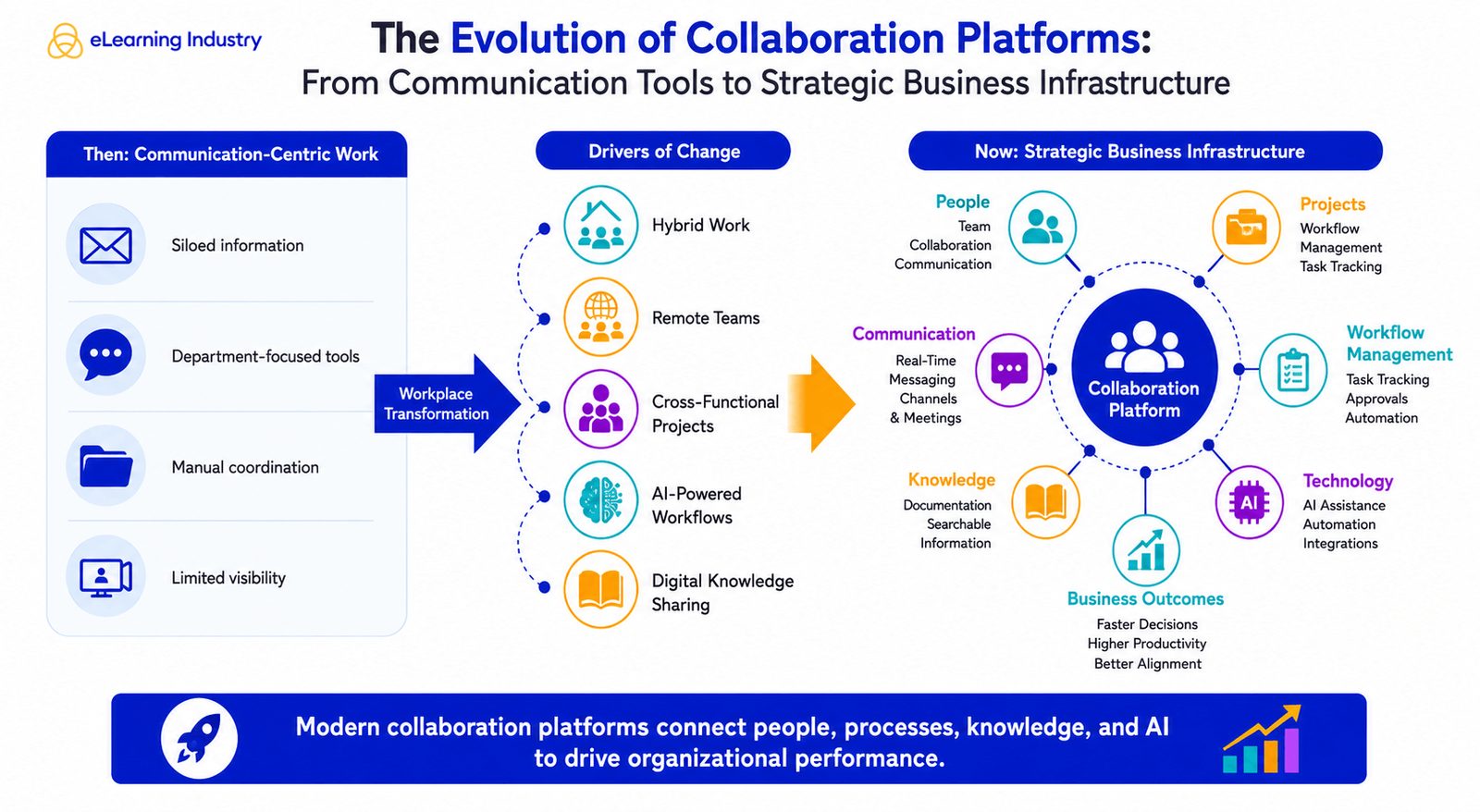
Why have collaboration platforms become more important than ever?
Hybrid and remote work have rewritten how teams connect. With people spread across locations and time zones, asynchronous work—where team members contribute at different times—has become routine, and collaboration platforms keep projects on track by centralizing updates and conversations. Organizations are also becoming more complex: HR, Learning and Development, Operations, and other departments must work together on cross-functional goals, which requires a single space to share resources and track progress. Additionally, knowledge is now a key competitive advantage. Platforms with strong search and shared repositories capture institutional memory, so expertise remains accessible long after projects end. However, the research also notes that technology by itself is not enough; collaboration is a business capability that must be deliberately built and continuously improved, not a task to complete.
What concrete business benefits do collaboration platforms deliver?
The most immediate benefit is faster communication and decision-making. Instead of long email threads or separate systems, employees use instant messaging, video calls, and shared documents to get updates in real time, cutting the time spent hunting for information. Cross-functional collaboration improves because marketing, HR, operations, and other teams work from a centralized space where everyone can see progress and align on goals. Project visibility rises with dashboards, task lists, and timelines that show responsibility and deadlines, boosting accountability. Employee engagement increases when people can easily share ideas and find resources, so knowledge-sharing tools help L&D and HR teams distribute training materials and onboarding information. Finally, collaboration platforms reduced operational silos—departments like customer success can feed feedback to product teams, and HR can partner with managers on workforce projects without barriers.
What core features should you look for in a collaboration platform?
Real-time communication is the backbone: team channels, discussion threads, live notifications, and video meeting features keep everyone in sync. Document and content collaboration matters just as much—look for simultaneous editing, comments, version tracking, and shared workspaces to avoid duplicate files. Task and workflow management is essential for execution: dashboards, task lists, timelines, and assignment tracking help teams see what's happening and stay accountable. Knowledge management and search features are critical, especially as organizations scale; a central repository with powerful search lets employees quickly find documents, training materials, and project updates. Security and governance cannot be an afterthought—encryption, role-based access controls, audit logs, and compliance support protect sensitive data. Finally, integrations with existing systems like CRM, HR software, and productivity suites let information flow across your entire digital workplace without manual work.
What are the main categories of collaboration platforms and which fits your use?
Enterprise platforms bring together communication, document management, knowledge sharing, workflow automation, and analytics into a single system, making them suitable for global teams spread across time zones and business units. Rather than juggling separate tools, organizations can use one central workspace to track progress and stay consistent. Team platforms are lighter and focus on messaging, file sharing, video meetings, and task management; they work well for departments, project groups, and remote workers who need to stay connected during the day, keeping conversations and documents in one place to avoid information silos. Project platforms emphasize planning and execution, offering task assignment, deadline tracking, resource allocation, and progress dashboards; they give teams clear visibility and real-time communication, which helps spot risks early and keeps complex, cross-departmental projects on track. Industry-specific solutions add niche features, such as construction software that lets crews share blueprints from the field or education platforms that support lesson planning and peer collaboration. Understanding these categories helps organizations match a platform to their workflows, team size, and collaboration style.
How should you actually go about choosing a collaboration platform?
Start with your collaboration objectives, not the feature list. Ask what problem you're trying to solve, who needs to collaborate, and which workflows require better visibility—for example, a growing company might need stronger coordination between HR, L&D, and managers, while a remote workforce may prioritize real-time tools. Next, assess user adoption risk: the platform must be easy to use, require minimal training, and fit how your team already works; explain why you're introducing it and offer support. Then evaluate security and compliance: check access controls, data protection, login methods, and whether it meets industry standards, especially in regulated fields. Examine scalability and integration potential—can it handle larger teams and more complex projects, and does it connect with your existing HR, learning, and project management systems? Finally, measure long-term value: focus on outcomes like reduced duplication of work, faster decisions, and easier knowledge sharing, not just upfront cost.
How do collaboration platforms support knowledge management and search?
Knowledge management and search are central to modern collaboration platforms. As organizations grow, information often becomes scattered across email threads, local drives, and different apps, making it hard to find what you need. A good collaboration platform solves this by offering a central repository for documents, discussions, and best practices, combined with strong search tools. Employees can quickly locate project updates, training materials, policies, and past decisions without chasing colleagues for help. This saves time and improves decision-making because everyone works from the same institutional knowledge. The platform captures knowledge from multiple departments: L&D can store training videos and guides, HR can keep onboarding documentation, and operations can share process handbooks—all in one searchable place. Over time, this creates organizational memory, ensuring that valuable expertise remains accessible long after projects are finished, even if team members leave or roles change. Effective search capability reduces duplication of effort and helps teams avoid reinventing the wheel, directly supporting productivity and business continuity.
What security and governance capabilities should you demand from a collaboration platform?
Secure collaboration platforms must offer encryption for data in transit and at rest, role-based access controls so only authorized people see sensitive information, and audit logs that track who accessed or changed what. They should also support compliance with industry regulations, such as healthcare or finance standards, and provide single sign-on for secure authentication. Governance features matter for larger organizations: administrators need to set permissions, manage user lifecycles, and enforce data retention policies without making the tool cumbersome for employees. A secure collaboration app should protect data without sacrificing usability—if security slows people down, they'll avoid the platform. Evaluate whether the platform lets you control data residency, supports compliance frameworks, and gives you the ability to revoke access promptly. Treat security as a basic business requirement, not an optional add-on, especially when the platform holds internal messages, project details, and proprietary information.
Keep reading

Careers
What Magoosh tells candidates about pay, remote hours, and cover letters
A look at Magoosh's candidate answers on non-negotiable salaries, flexible remote schedules, and cover-letter review.